Tap-to-Share Business Card (Powered by a Conference Wristband)

>_YOU'RE IN.

Welcome to the Red Team Village Party at DEF CON 34! Thank you for joining us—your physical NFC token got you past the guards.
A re-programmable NFC wristband from Red Team Village Arcade Party, turned into a live digital business card, built with Claude.
Overview
Instead of a lanyard badge, this year’s Red Team Village Arcade Party gave attendees bright red wristbands with an NFC chip built in and fully reprogrammable. Rather than let it sit in a drawer after the event, I turned it into a tap-to-share digital business card: tap the band against a phone, and it opens a mobile-friendly page with my contact info and a one-tap “Save Contact” button.
I’d actually attempted a version of this project before, hand-coding it during a semester of Java and later trying to patch together a Python version with ChatGPT. Neither attempt made it past a folder titled “revisit someday.” This time, Claude built the whole thing in one sitting.
Tools Used
– Claude – generated the business card page from a single prompt and a short back-and-forth
– NTAG-series NFC chip – the reprogrammable chip inside the wristband
– NFC Tools app (by wakdev) – used to write the URL to the chip
– WordPress (self-hosted) – hosts the card as an uploaded file, linked directly rather than built as a page
The Process
I started with one prompt:
make me a digital business card that I can have linked on my website but will be mobile/friendly. I plan to use this with a NTAG series chipClaude asked a few clarifying questions first: what info to include, whether to add a “Save Contact” button, what style to use, and whether I had a photo to add. From there it generated a complete, single-file HTML page styled to match my website’s color scheme, with an embedded photo and a script that generates a downloadable vCard on tap.
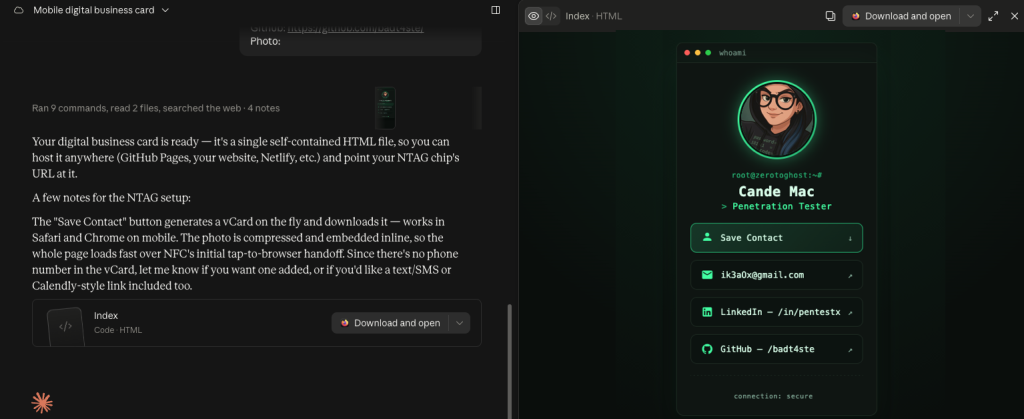
Once the card was live, the process was:
1. Test the “Save Contact” button on my own phone to confirm the vCard worked as expected
2. Upload the finished HTML file directly to WordPress through the Media Library, rather than rebuilding the content inside a page editor
3. Copy the uploaded file’s direct URL
4. Open the NFC Tools app, choose Write → Add a record → URL/URI, paste in the link, and write it to the chip
The Result
Tapping the wristband against a phone now opens the card instantly. No app required on the visitor’s end, and no rebuilding it as a native WordPress page. The whole build, from prompt to a working chip, took about 5 minutes, less time than it took to write about it afterward.